

GA4 (Google Analytics 4) For Beginners: An Introduction for Digital Marketers

GA4 is Google’s latest analytic property that helps website admins and developers measure user activity on websites and apps. Google Analytics 4 was launched by Google in October 2020. It is an updated version of Universal Analytics. The primary difference between the two is that UA used to collect session based data, things like: time on page, pages per session, while GA4 collects event based data that focuses primarily on engagement.
Table of Contents
ToggleWhy Should Digital Marketers Learn GA4?
- GA4 collects both website and app data. Giving a holistic understanding of the user’s experience.
- Partakes in cookieless measurement, which protects the privacy of users.
- Primacy is given to user behaviour instead of simply user action.
- Offers predictions based on behaviour instead of relying on other complex models.
- The information offered is much more visual and interactive (with lots of graphs and charts) thereby, easy to comprehend.
- Allows you to select and track particular events (especially with the help of Google tag manager) that the user participates in, that you think are important for your site.
- Helps you directly integrate with media platforms (Facebook, Instagram and so on), and you get to have all the necessary information in one place.
Why did GA4 Replace Universal Analytics?
GA4 vs Universal Analytics: A Table of Comparison
|
Metric / Concept |
Universal Analytics (UA) |
GA4 |
Key Change / Notes |
|
Engagement / Bounce |
Tracks Bounce rate, i.e. percentage of users who leave without interaction |
Tracks Engagement rate, i.e., percentage of users who interact |
GA4 flips focus to active engagement. (Information about bounce rate is still available) |
|
Session Duration |
Tracks average session duration |
Tracks average engagement time per session |
GA4 measures actual active engagement time, not just total session duration. |
|
Events |
Event tracking requires manual setup with category/action/label |
Events per session tracked automatically |
GA4 tracks events natively, no need for category/action/label schema. |
|
Engaged Sessions per User |
Not a standard metric |
Yes, automatically tracked |
Shows how many sessions each user actively engages in. |
|
Session Tracking |
Sessions are tracked by time. There is a midnight reset. And reset when a new campaign is launched. |
A Session start is triggered by an event and a session ID is attached to events. |
Sessions don’t reset at midnight or on new campaigns; timeout-based tracking. |
|
Pageviews / Views |
Pageviews tracked per page load |
Views combine pageviews and screenviews |
Repeated views are still counted; better for apps + websites. |
Differences That Matter Most to Digital Marketers?
Granular Tracking
- A marketer can track micro‑interactions along the whole funnel (e.g., scroll depth, file downloads, video progress).
- They can see exactly where users are dropping off and what behaviour foretells conversion.
Unified Tracking of Websites and Apps
- Universal analytics only tracked user interactions with websites and apps required a different stack, while GA4 lets you track website and mobile app in a single property
- This helps marketers understand user journey across platforms and allocate funds accordingly to web and app campaigns (of course depending upon which has better reach).
Analytics Intelligence and Predictive Features
- GA4 introduces “Analytics Intelligence” and predictive features.
- For instance, a marketer will be alerted if there is a sudden spike in conversion rates, coming in from a particular campaign.
- They will also be shown segments like “likely to purchase in the next 7 days” which a marketer can export directly to Google Ads
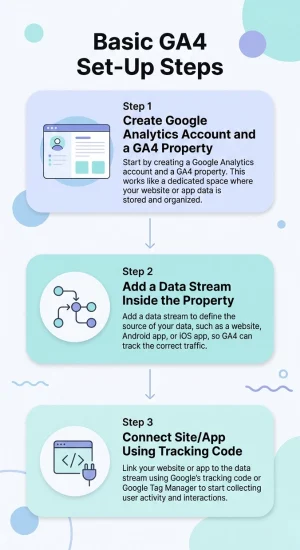
Basic GA4 Set-Up Steps
- First, you create a Google Analytics account and a GA4 property, which is like opening a new “file” where all the data for one website or app will be stored and reported.
- Next, you add a data stream inside that property, which just means telling GA4 where the data will come from (for example, a specific website URL, an Android app, or an iOS app) so it knows which traffic belongs where.
- Finally, you connect your site or app to that data stream using Google’s tracking code (or Google Tag Manager), so every visit, click, and interaction can be sent into GA4 and shown in your reports.
To be Noted – Once Google Analytics starts receiving data, it will first show up in “realtime report” and then in other reports shortly after.
Important GA4 Terms Beginners Must Know
Users – Real persons who visit your website/app. GA4 knows them as an anonymous ID. Remember – If the same user comes back the next day on the same device and browser GA4 counts them as one user.
Sessions – Refers to a single visit to your site/app. It begins with the user coming in and ends with either the user leaving or after a defined period of inactivity.
Events – It is an action an user takes. Like viewing a page, clicking a button, filling a form and so on.
Engagement – Refers to how actively people are interacting with your content. The more relevant and creative your content is, the higher the engagement rate.
Key events – These are events that are most important for digital marketers. GA4 allows marketers to mark certain events as “key” events so that they are easier to track.
Conversions – Conversion is the ultimate goal of marketing campaigns. It refers to completed purchases, submission of a form, a sign-up and so on.
Conclusion
Setting up Google Analytics is not a difficult task, the challenging part is understanding the reports and not getting overwhelmed by the sheer amount of information available. Strategically learning how to navigate GA4 can help you make important decisions regarding your campaigns and overall content management on your website/app. Google skillshop offers a certificate course on Google Analytics that you can avail for free, it takes just over an hour to complete. If you are in need of a more guided lesson, where the specific concerns of your brand are particularly being attended to, you may register for online courses offered by various digital marketing institutions.
FAQs
Google Analytics 4 (GA4) is Google’s latest analytics tool that tracks how people use your website and app in one place. Unlike Universal Analytics, which focused on sessions, GA4 focuses on events and user engagement, giving more detailed behaviour insights.
Digital marketers should learn GA4 because it measures both website and app activity, supports privacy‑friendly, cookieless tracking, and offers smart predictions. It also makes it easier to see which user actions matter most and turn that data into better campaigns.
First, create a GA4 property in your Google Analytics account and add a data stream for your website or app. Then connect your site or app using the tracking code or Google Tag Manager so GA4 can start collecting data.
Key events are the important actions you want to watch closely, like sign‑ups or add‑to‑cart clicks. Conversions are the most valuable actions for your business, such as purchases or completed lead forms, and they are usually marked as key events in GA4.
GA4 shows detailed user behaviour, such as where people drop off in your funnel and which actions lead to conversions. Its predictive insights and easy‑to‑read reports help you allocate budget better and optimize content, ads, and user experience.

