

How to Run a Google Ads Campaign: A Guide for Beginners in 2026

New to Google Ads? Do not worry, we have broken down in a very easy to follow and simple format all the steps that you need to complete to run your first ever Google Ads Campaign, since this is for beginners, we have explained only how to set up a campaign that lets you advertisements pop up on search results only.

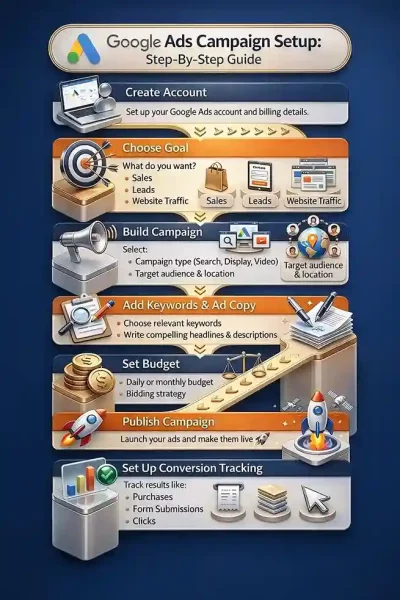
Let us begin with a map of Google Ad’s setup path:
- Create an Account on Google Ads
- Choose a goal (what is it that you want to achieve? Sales, Leads, Traffic)
- Build a campaign.
- Add keywords and ad copy.
- Set up a budget
- Publish
- Set up conversion tracking.
Table of Contents
ToggleStep 1: Creating A Google Ads Account
Type google ads onto your search engine, and go to their official site then follow the following steps.
- Create a new google ads account (you can create one without a campaign)
- Enter your business details (name of your business and its website URL)
- Click on create a new payments profile (choose whether the business is individual or organizational.
- Add more business details (address, name of organization)
- Add payment method.
- Add some money to your account (minimum of Rs 500, you will need this if you are creating an account without the campaign)
- Submit.
Once you are done creating an account, you can set up your campaign by doing the following:
- Click on “New Campaign
- Select your campaign objective. Whether you want sales, leads, traffic, promotion, awareness or local store visits.
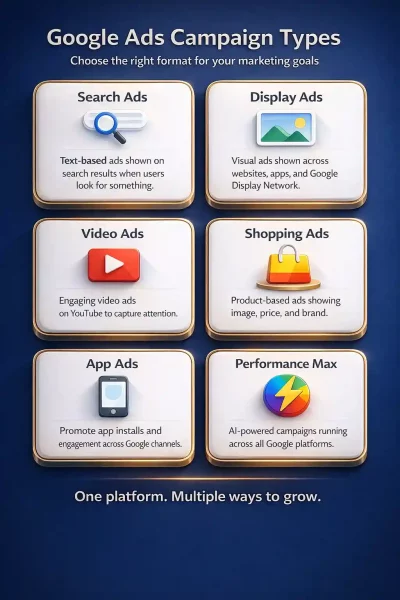
- Select a campaign type. Whether you want your ads to appear on search results, on various website pages (display), as products that consumers can buy (shopping) or run ads on youtube as videos, across all platforms (Performance Max). If you wish to drive demand and conversion on YouTube, Discover and Gmail with image and video ads use Demand Gen)
If you are running an ad for the first time we recommend that you run it only on search results. This will cost you less, requires no designing and also you will have an idea of the platform and its efficacy.
Step 2: How to Run Ads that Show Up on Search Results?
Follow the steps below to set up your ad campaign on search results (this is a continuation of the previous steps):
- Select on Search under Select a campaign type.
- Select your goal (do you want website visits, phone calls, store visits or app downloads?)
- Add the necessary details required for each (website URL, phone number and so forth)
- Select what your conversion goal is (do you want people to purchase a product, or subscription)
- Give your campaign a name
- Agree and continue
- The next page is the bidding page, here you will be asked what you would like to focus on, conversion, conversion value, clicks or impressions. (as a beginner, it is ideal to choose conversion)
- Click Next
Step 3: Setting Up the Ad Campaign
- In campaign settings, keep Search Network enabled.
- Disable Display Network if you only want search ads. (Display network is costlier)
- Set your target locations.
- Click on advanced search, type in all the locations you want to target.
- Click on location option and you will be allowed to choose if you want your ad to appear only to those who are present in the location (presence) or if you want them to be visible to people who show interest in the location (presence or interest)
- Click Next.
Step 4: Choosing the Right Keywords
This is the most important part of the process, therefore, we will make sure we don’t simply use the keywords Google ads automatically suggests for our business, instead we shall use google’s keyword planner:
- Open Keyword Planner.
- Click Discover new keywords.
- Enter keywords related to your business and your website URL.
- Review keyword ideas and select the ones you want to target.
- Add your selected keywords to the ad group.
- Enter your final URL.
Step 5: Creating Ad Content
- Scroll down and you can find the section where you can add your final URL, display path and headlines and descriptions (you will be shown a preview of what it will look like)
- Add your headlines.
- Add your descriptions.
Step 6: Set Your Budget
- A default budget will be shown to you, if you wish to change it, click on custom budget.
- Mention how much you are willing to spend daily, to run the ads (you will be shown how many conversions you can expect per week and what your weekly spending will be)
- Click next, scroll down and publish campaign.
Google will take two days to review the ad and approve it, only then your ads will be shown publicly.
Tracking Your Ad’s Performance
The simplest way to find out how your ads are performing online, is to set up google tag manager, read our simplified guide to GTM to learn more about what it is and how to set it up. If you want to attain professional grade, certificate training on Google Tag Manager, check out Gyaner Academy’s GTM Course, that is designed to make your tracking dependable, structured, and easy to manage.
Conclusion
Designing and running successful ads is one of the most important parts of digital marketing. It is a process that takes a few trials and errors, because almost no brand can immediately figure out what kind of advertisement and visibility actually puts them in good terms with their customers. Running ads is costly business, therefore, it is advisable that you come to it with as much planning as you can practically do. It helps to obtain some technical knowledge and learn the secrets of the trade. This is where Gyaner, Hyderabad’s leading digital marketing institute can help you out. We have a dedicated google ads course, that is tailored to equip you with the latest techniques in which Google Ads can be set up and of course we teach you how various AI tools can help you achieve perfection. Visit gyaner.com to know more about all of our digital marketing courses.
FAQs
The first step is to create a Google Ads account and add your business and payment details.
A Search campaign is best for beginners because it is simpler, cheaper, and easier to manage.
Beginners should use Google Keyword Planner to find simple and relevant keywords for their business.
You can start with a small budget and choose a custom daily spend based on what you can afford.
Google usually reviews and approves ads within about two days before they start showing.
You can track results using Google Tag Manager to see how people interact with your ads.

