

Rendering Simplified: Learn How Your Webpages Make Themselves Visible to the Users.

When you are surfing the web, you inhabit an alternate reality, everything moves exceptionally fast, unlike in the world which exists outside of the screen. You do not like giving a site more than three seconds to load. The internet is a space where time moves furiously fast. In order to make that happen, countless processes take place beneath the surface. Rendering is one of them. Rendering is the process by which your browser makes the contents of a webpage visible to you. Rendering happens after crawling and before indexing. If you are a digital marketer it is important for you to understand how rendering works and why it affects SEO.
Table of Contents
ToggleHow Would You Explain Rendering to a 15 Year Old? (Oh yes I definitely know what I am doing.)
Let’s say you are Dorian Gray and you absolutely love the way you look. What do you do? You go to your favourite artist and you commission them to have a portrait of yourself painted. Similarly, every time you look something up on the internet, you are basically asking it to paint you a picture, something that you can see before your eyes.
Painting often follows a process: first, a sketch is made, then the measurements are made and colours are chosen, then it is painted and finally presented. A similar process is followed when you click on a webpage.
Step 1 of Rendering: Fetching the HTML of the Webpage
Now think of yourself as the painter. The first thing you do is prepare a basic outline, a blueprint of what it is that you want on your page. The HTML (HyperText Markup Language) code of a webpage is just that.
- HTML is the blueprint of a webpage.
- Crawling bots do not see a site like you do, they rely on codes to understand what is on the site, the HTML code is the first code that the crawler sees when it tries to render your site.
- The HTML contains the links to CSS (Cascading Style Sheets) and JavaScript, which we shall talk about in the next steps.
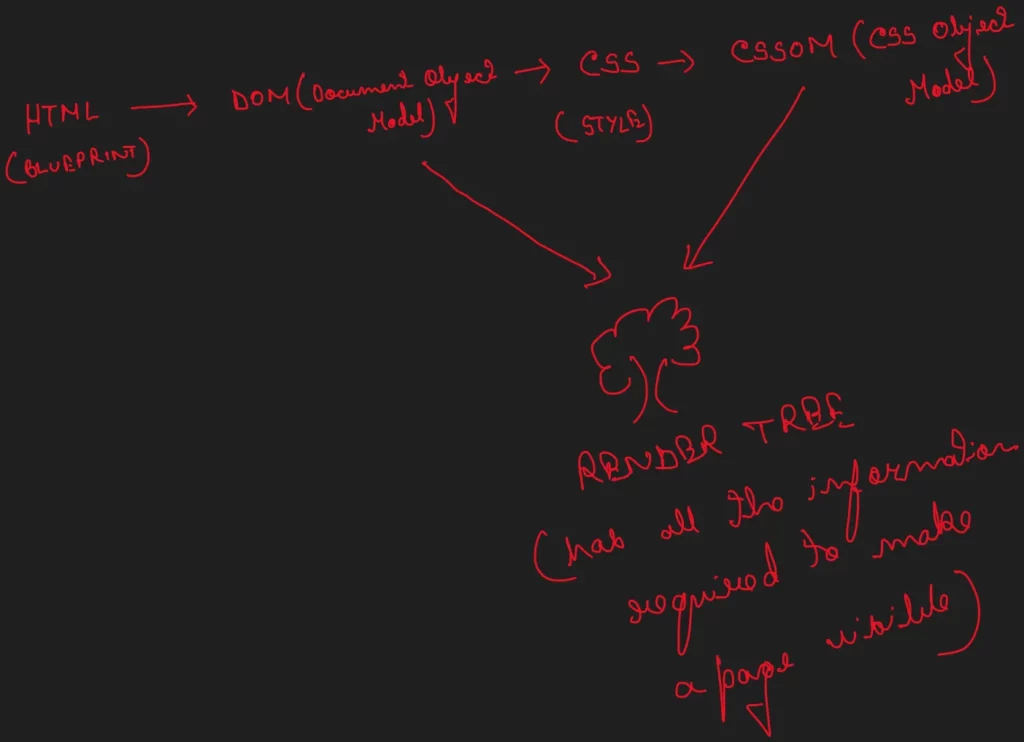
- When the HTML is processed, it creates a basic model of the page which is known as Document Object Model (DOM)
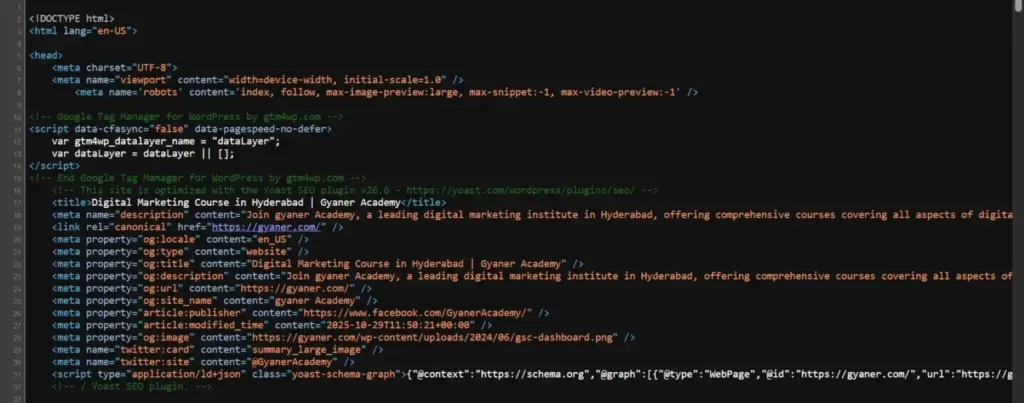
How to See the HTML Code of any Webpage?
If you want to see the HTML code of any webpage simply visit the webpage, right click on it and select the option “view page source”. Shortcuts: Ctrl+U for Windows ⌘ + Option + U for Mac.

Step 2 of Rendering: Fetching the CSS
You have a basic outline of your painting. Now you have to place the right objects in the right place. Figure out the proportions and the layout. On the web this job is done by the CSS code, which the crawler accesses through your HTML code.
- The full form of CSS is cascading stylesheets and as the name suggests it takes care of the visual style of each element on the webpage.
- It contains information about colours and fonts of the elements present on a page.
- The model created after the CSS is processed is called CSS Object Model (CSSOM)
- The browser combines the DOM and the CSSOM to create a Render Tree
- The render tree therefore consists of all possible information that a browser might need to make a page visible to the users i.e. the blueprint and the stylesheet.
Step 3 of Rendering: Going the Extra Mile with JavaScript
Remember I asked you to pretend to be Dorian Gray. Do you remember what kind of picture of him was drawn? A dynamic one, that changed with time, that could be interacted with. The painter (his name was Basil) must therefore have used a special ingredient to paint, if you are a website developer your ingredient will be the Java Script.
- The JavaScript is required to make a page dynamic and interactive
- Caution must be practiced while using the JavaScript because it is challenging to load and may lead to indexing errors and SEO performance.
The Primary Precaution to be Taken When your Webpages have JavaScript
Make sure that the most important information on your page is made available to the crawling bots through your HTML itself, so that even if the JavaScript is not being processed, your site at least gets rendered and indexed.
Conclusion
Crawling bots are necessary to have your webpage rendered and indexed, these bots go to your webpage, gather information and also try to make sense of how you want your pages to be displayed. To do this, the bots mimic an ordinary browser but without the GUI (Graphical User Interface), and are called headless browsers. They are used to test the pages, whether they are responding to user commands, if there are any errors in displaying the content and so forth. The bot/ headless browsers then follow the process mentioned above, it accesses the HTML, the CSS and the JavaScript to complete the process of rendering. Visit our blog Understanding how Rendering Affects your SEO Performance to know more about how you can influence rendering in a way that increases your SEO performance.
You have scrolled this far, clearly you want to learn more about what goes on behind the scenes of digital marketing. Trust me, it is so much better to have it taught to you by experts than reading long blogs. But hey I did pretty well too! You learnt something, right? Well you can learn better from our amazing faculty here at Gyaner, the best digital marketing institute in Hyderabad. Pay us a visit at https://gyaner.com/ to learn more about our courses. It would be an honour to be rendered by your browser!
HTML (HyperText Markup Language) is the code that contains the blueprint of the website. The HTML is the first file which the crawler uses to render the site, the Document Object Model (DOM) is created after the crawler is done parsing the HTML. It contains the link to CSS and JavaScript.
CSS (Cascading Stylesheet) contains information about the colours, fonts, layouts and overall style of the page.
JavaScript is what makes the site interactive and dynamic. You can also choose to not have JavaScript. A perfectly functional webpage can be created even without it.
Through the process of Rendering. In the case of (Server Side Rendering), the server reads the HTML file, creates the basic blueprint called DOM, reads the CSS, creates the CSSOM. CSSOM and DOM together form the render tree which contains all the information necessary for the server to make the site visible. If your page also has a JavaScript, that too is used to create the render tree.
HTML is always separate for each page. CSS may or may not be the same, it is shared across pages of a site if consistency of style is required. The Javascript also may or may not be the same for each page, it depends on what ways each page needs to be dynamic, again, \ if consistency is required, it can be shared across pages.
Yes, rendering affects the ranking of your page. After your page has been crawled the bots (acting like real browsers called headless browsers) render it, to see if it can be made visible to the users without any issues, if the bots are unable to render your site, it will not be indexed properly, thereby hurting your rank.