

Why your Website Needs a Sitemap: Its Functions, Types and How to Use Them Effectively

A sitemap is a file where the creator of a website provides information about the pages, videos, and other types of files included in it and the relationships between them. Search engines read this file to crawl the site more productively. The sitemap tells crawlers which of your pages and contents are most important and what their locations are. Having a detailed sitemap submitted to the various search engines is imperative for having good SEO health.
Table of Contents
ToggleWhen does your Website need a Sitemap?
Your website should always have a sitemap irrespective of its size and content. However, they are absolutely indispensable:
When your Website is Large
Possible Problem
A larger site increases the possibility of one or a few of your pages not being linked properly. Every page needs to be linked by at least one other page of the website to ensure discovery by search engine bots.
Sitemap as a Solution
Having a sitemap ensures that all your important files are discoverable by bots. Think of a sitemap as the string or as the stapler you use when you submit a document that has multiple pages. Even if your name is written on each one of them, not tying/stapling them together may lead to the pages’ being lost.
When Your Website is New and Has Few External Links Pointing at it
Possible Problem
Crawlers get the location of newer content on the web from the information it gathers from previously crawled pages. If your site is new and there are few other pages that have the link to your page, a bot might not discover your page.
Sitemap as a Solution
When you use a sitemap, you are basically giving the search engine crawlers the exact location of all your pages, even if no other page on the internet has a link to your page (known as a backlink), your page will be discovered by the bot.
When your Site is Rich in its Media Content Especially News Content
Possible Problem
More media means more information attached to that media, videos have running times and age appropriateness ratings, images have locations and news is updated constantly, all this information needs to be made available to crawlers.
Sitemap as a Solution
Sitemap ensures all this information is made available to crawlers. Google dedicates special tabs for news, videos and images, using a sitemap will also ensure that the media content of your site shows up in the relevant tabs.
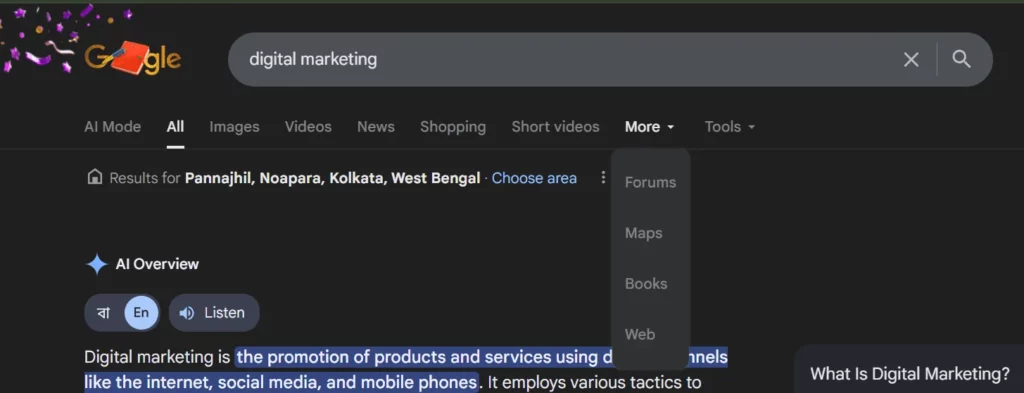
Fig 1. Tabs dedicated to various media content on Google.
What Information do the Sitemaps Provide Crawlers About Specific Types of Content on Your Page?
Video
- Running time
- Age appropriateness rating
Alternative – Google encourages the use of video sitemaps and alternatively also supports mRSS feeds.
Image
- Location of the image
- Especially those images that your site reaches with JavaScript code.
News Entry
- Article title
- Publication date
To be noted: For each of the above media, google supports a separate sitemap created just for them as well as extensions made to your overall sitemap. However, it is suggested that you create a separate sitemap for your news content for better tracking.
Alternate Language
- If your page has alternate language versions it will have separate URLs for each.
- Sitemap stores all the alternate language versions.
Mobile Version
- If your site has a separate URL for a mobile version a sitemap helps it in getting located.
The Various Formats of Sitemaps
There are three formats in which Sitemaps can be written according to the sitemaps protocol:
- XML Sitemap
- RSS/Atom Sitemap
- Text Sitemap
The following table shows which format can host which types of content and compares their features.
| Feature | XML Sitemap | RSS/Atom Sitemap | Text Sitemap |
|---|---|---|---|
| Web Pages | ✔ Yes | ✔ Yes | ✔ Yes |
| Images | ✔ Yes | ✖ No | ✖ No |
| Videos | ✔ Yes | ✔ Yes | ✖ No |
| News Articles | ✔ Yes | ✖ No | ✖ No |
| Multiple Languages | ✔ Yes | ✖ No | ✖ No |
| Easy to Create | ⚠ Medium | ✔ Yes (auto-generated) |
✔ Yes |
| Easy to Update | ⚠ Medium | ✔ Yes (auto-generated) |
✔ Yes |
| Best For | Sites with mixed content (pages, images, videos) |
Blogs and sites with video content | Simple sites with just web pages |
Fig. 2 XML, RSS/Atom, Text Sitemap Comparison
What are HTML sitemaps?
The three formats of sitemaps mentioned above are created to communicate with crawlers, an HTML sitemap is created to help the human users of the website navigate all the important sections in it. It looks like a regular page.
Having a HTML sitemap is not very common because websites aim to be built in a way that is user friendly, you should be able to navigate a website without needing a sitemap.
How to Create a Sitemap
You need not be exceptionally tech-savvy to create your own sitemap. Most CMS (like WordPress, Wix) generate your sitemap automatically. Alternatively, there are several online tools (XML Sitemap Generator, SEOptimiser) that will let you generate a sitemap and all you need to do is paste your URL.
Remember to:
- Submit your Sitemaps to Google Search Console and Bing Webmaster Tools. (you can submit your sitemap to Yandex and Baidu if you want to reach an audience in Russia and China respectively)
Look out for broken links, duplicate sites and always split your sitemap if it exceeds 50,000 URLs (scroll to the bottom of this article for a list of common mistakes to avoid).
Submitting a Sitemap to Search Engines
Certain search engines have a provision that allows you to submit your sitemap. Without submission you might not get SEO benefits and your pages might not be discovered.
You can submit your sitemap to Google Search Console, Bing Webmaster Tools, Yandex, Baidu for these engines to find all your pages. Remember to regularly update your sitemap as you publish newer content.
Where can you find a Website’s Sitemap?
Root Directory of a Domain
Try adding the following emboldened texts after the final “/” of the website whose sitemap you are trying to look at.
- anexample.com/sitemap
- agoodexample.com/sitemap_index.xml ( “index” means this is a list of all the sitemaps for a site)
- afantasticexample.com/sitemap.xml (this is where ours is)
If they do not work try the following paths instead:
- /atom.xml
- /rss.xml
- .xml.gz (a compressed sitemap file)
- /sitemap1.xml
- /sitemap/sitemap.xml
- /sitemapindex.xml
The robots.txt File
The robots.txt file is located in your root directory and advises crawlers about which pages of the website a crawler should crawl and which to ignore. This is also a place where a sitemap can be found.
Simply add robots.txt as a path: https://www.outstandingexample.com/robots.txt
You can find the sitemap located after the “Sitemap:” directive. An example is given below.
User-agent: *
Allow: /
Disallow: /admin/
Sitemap: https://www.example.com/sitemap.xml
Mistakes to be Aware of While Creating a Sitemap
- Make sure you do not have any broken links. Use a sitemap checker like SEOptimer, XML-Sitemaps to make sure your sitemap has no errors.
- Exclude files that have a noindex tag or are disallowed by robots.txt, this wastes crawl budget
- Sitemaps that exceed 50MB, uncompressed, (has more than 50,000 URLs) are not fully processed, split the sitemap into smaller files, then use a sitemap index file to link them together.
- Avoid having duplicate and parameterized URLs.
- Avoid having HTTP URLs, make sure all of your URLs are HTTPS.
- Always include mobile friendly URLs and hreflang URLs (for alternate language versions) in your sitemap.
Conclusion
Sitemaps are absolutely necessary for your website, even if your website is small and new. It is the most basic way to make sure that every section of your site is made available to the users of the internet. It is most important that you remember to update your sitemap regularly as you publish newer content. Make sure that your sitemap has no structural or formatting errors and always remember to not include pages that you do not want to be made available to the users.
Here at Gyaner we offer a dedicated SEO course that covers technical, navigational and creative aspects of SEO. Visit Gyaner.com to learn more about the SEO course and all other courses offered by us.
FAQs
A sitemap helps search engine crawlers locate all the important links present in your website so that they can crawl them effectively.
While it is not mandatory, you should definitely consider using one because it helps all the pages in your website get crawled and indexed.
Use a sitemap checker like SEOptimer, XML-Sitemaps to ensure that your sitemap has no errors. Then submit your sitemap to Google Search Console or Bing Webmaster Tools, they give you a detailed report of your sitemap.
The CMS that your website uses automatically generates a sitemap for you. If it has not, you can generate your sitemap using online tools like XML Sitemap Generator, SEOptimiser.
A sitemap is to be uploaded to your site’s root directory or robots.txt file. Bing and Google require you to submit your sitemap to them through Bing Webmaster Tools and Google Search Console. Submit the same to Yandex to reach your audience in Russia and Baidu for China.

