

Google Analytics course, taught inside real ad accounts
Hands-on GA4 training where you build the tracking, break it on purpose, and fix it. Taught inside our Digital Marketing course.
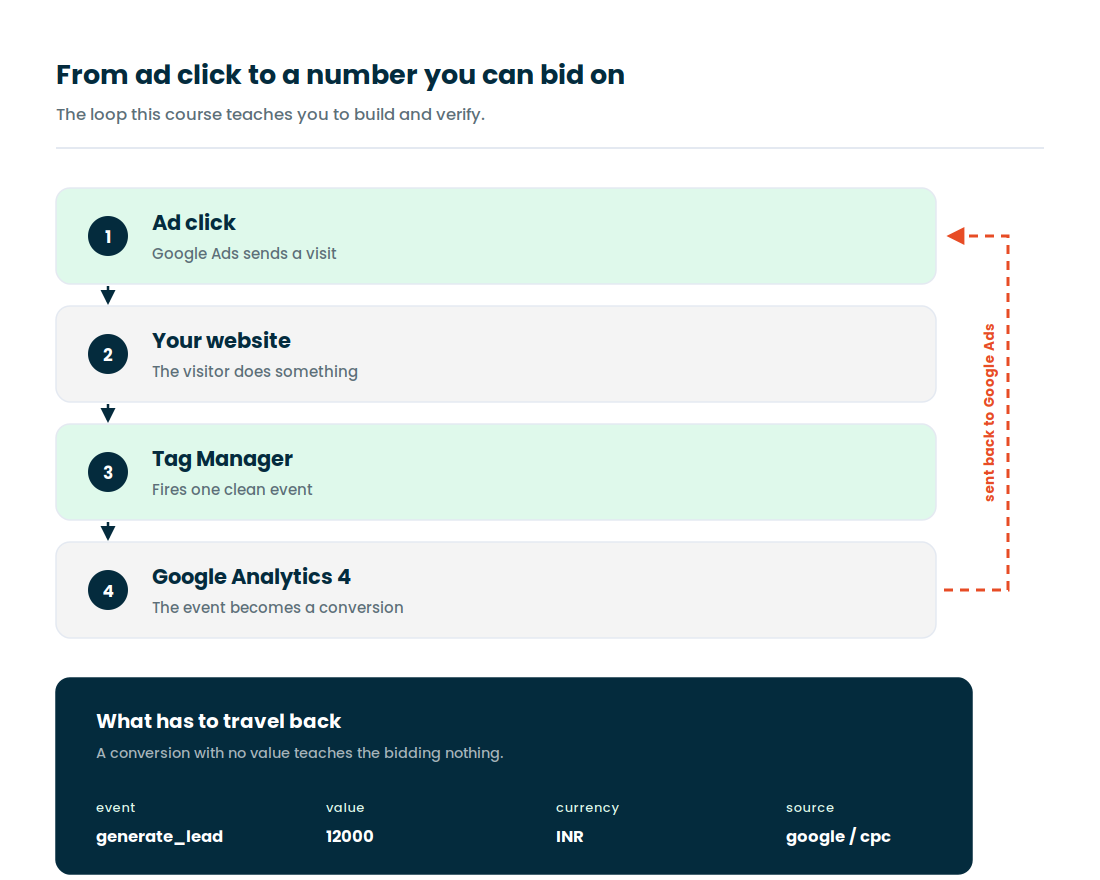
Analytics stopped being a reporting job and became plumbing
Ad platforms under-report. Pixels break silently. Cookies keep dying. GA4 is the one place a business can still see what actually happened, and almost nobody in a marketing team knows how to set it up properly. That gap is why the skill pays.
- Set up event and conversion tracking that survives a site redesign
- Connect GA4 to Google Ads, Meta and your CRM without breaking attribution
- Read a user journey end to end without waiting on a developer
- Find the attribution gaps that quietly waste ad budget every month
- Build a report your founder actually opens on Monday morning
- Debug a broken tag in ten minutes instead of blaming the agency
Google Analytics runs inside the Digital Marketing course
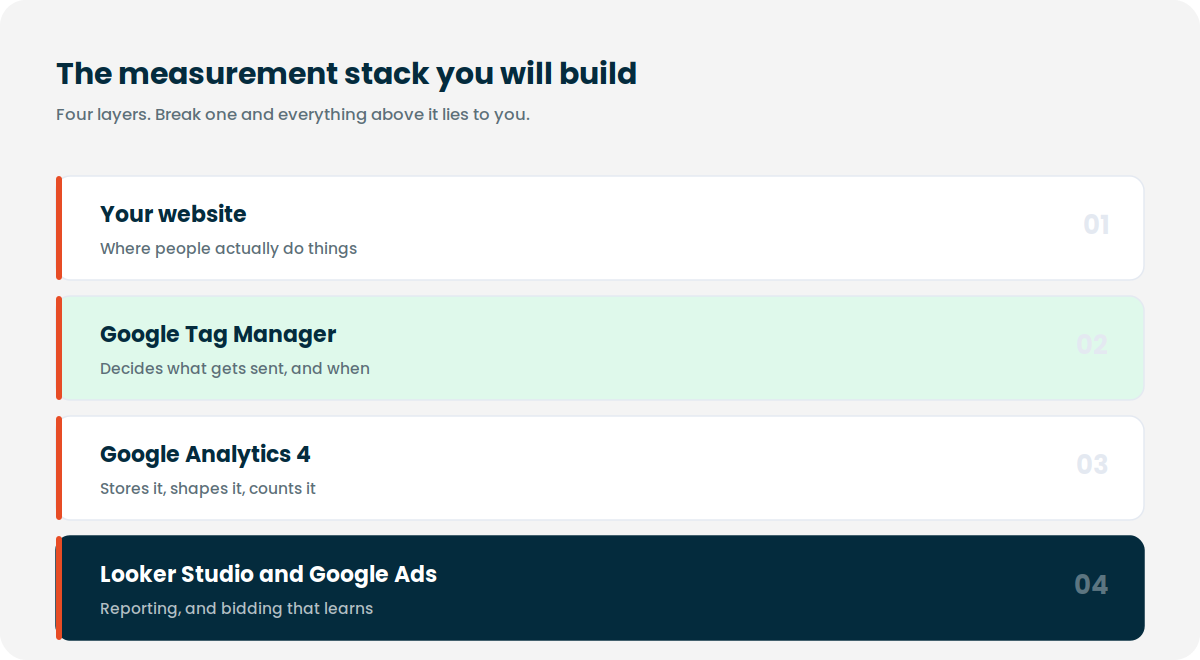
We do not sell GA4 as a standalone class, and that is a deliberate call. Analytics taught on its own leaves you with a property full of clean events and no campaigns to point them at. Learning it beside Google Ads, SEO and Meta Ads is what makes the tracking mean something.
So you enrol in the Digital Marketing course and the entire GA4 track below is part of it, at no extra charge.
Syllabus, batch dates, duration and enrolment details are all on that page.
Four kinds of people sit in this room
If you recognise yourself in one of these, the GA4 track will fit. If you are looking for a theory class with slides and a quiz, it will not.
Performance marketers
You run Google Ads or Meta Ads and you are tired of three tools reporting three different lead counts. You want to be the person who settles that argument.
Founders and business owners
You are paying an agency and you cannot verify a single number they send you. A few weeks of this and you can check their work yourself.
SEO and content people
You rank pages but cannot prove what those pages earn. Search Console plus GA4, joined properly, fixes that conversation with your client.
Freshers and career switchers
No coding background needed. Basic comfort with a browser and a spreadsheet is enough. Everything else is taught from zero.
Nine modules, in the order the work actually happens
The sequence matters. You cannot debug tracking you did not plan, and you cannot plan tracking without understanding how GA4 thinks about events. So this goes in build order, not textbook order.
Data foundations and measurement logic
How GA4 turns raw behaviour into signals, and why habits carried over from Universal Analytics keep tripping people up. The goal is that measurement starts feeling logical instead of arbitrary.
Event structure and tracking plan
You map real user actions into a written tracking plan before touching a single tag. This is the step almost every institute skips, and it is the reason most GA4 setups fall apart in month two.
Conversion setup and validation
Configure conversions, then prove they fire correctly across devices and browsers. You learn a repeatable checking routine rather than crossing your fingers.
Google Tag Manager essentials for GA4
Tags, triggers, variables and the data layer. GTM becomes your execution layer, set up so the next person who opens the container can actually read it. More depth in the GTM course.
Channel attribution and path reading
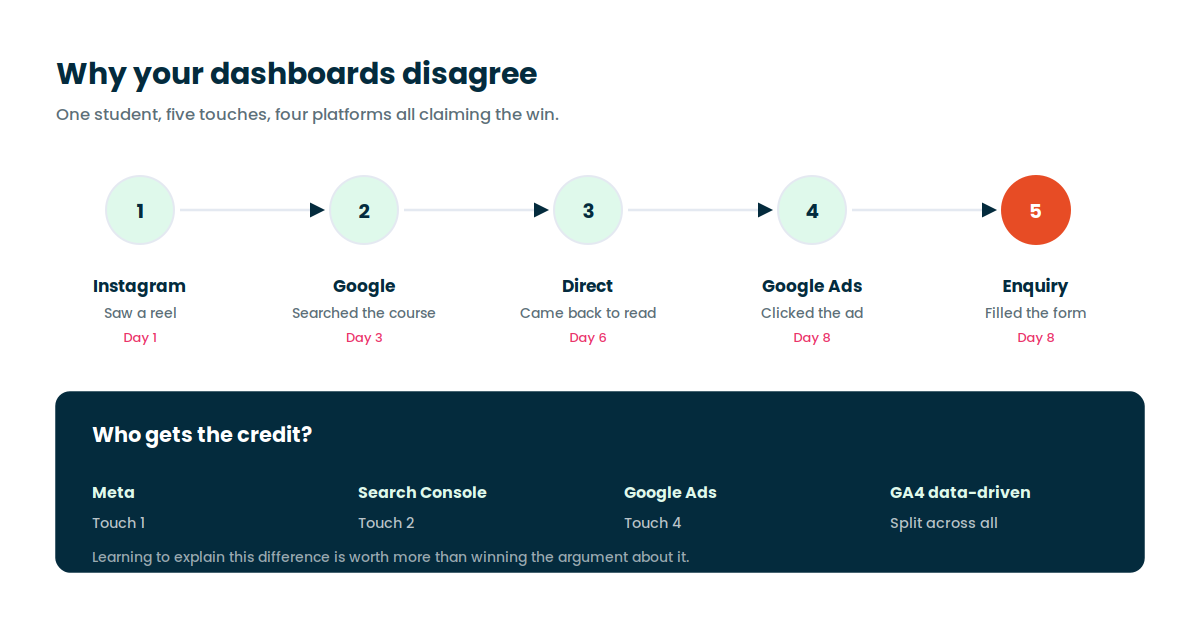
Multi-channel journeys, attribution models, and why your last-click report and your Meta dashboard will never agree. You learn to explain the difference instead of arguing about it.
GA4 and Google Ads integration
Link the accounts, import conversions and send signals worth bidding on. This is where measurement stops being a report and starts changing campaign performance. Pairs with the Google Ads course.
Explorations, dashboards and Looker Studio
Funnel and path explorations, segments, then a Looker Studio dashboard someone will actually use. Usability over decoration.
Debugging and troubleshooting
DebugView, Tag Assistant, real-time checks and the network tab. Broken signals, duplicate events and mismatched numbers, handled with a calm step-by-step routine.
Capstone: a full measurement setup
You take a live site from nothing to a verified GA4 property with events, conversions, Ads linking and a working dashboard. That capstone becomes the thing you show in interviews.
Real accounts, not screenshots of accounts
You get a practice property and a practice GTM container from day one. Everything below is used hands-on during the Google Analytics training, not just described on a slide.
Two certificates, and one of them comes free from Google
Google runs its own Google Analytics Certification on Skillshop and it costs nothing. We prepare you for it directly, including the question patterns people usually get wrong. Passing puts a Google-issued credential on your LinkedIn.
Alongside that you get the Gyaner Academy completion certificate, issued after your capstone setup is reviewed and approved. It is not attendance-based, so it means something.
What you walk out with
- Google Analytics Certification prep and practice questions
- Gyaner Academy completion certificate
- A tracking plan template you will keep reusing
- A live GA4 setup you built, to show in interviews
Where GA4 skills show up on a salary slip
Analytics rarely gets its own job title in Hyderabad. It shows up as a requirement inside performance marketing, growth and SEO roles, and it is usually the line that separates two otherwise identical candidates.
| Role | Where GA4 fits | Typical range in Hyderabad |
|---|---|---|
| Performance marketing executive | Conversion tracking, Ads import, ROAS reporting | Rs 3.0 to 5.5 LPA |
| Digital marketing analyst | Explorations, dashboards, channel attribution | Rs 4.5 to 8 LPA |
| SEO specialist | Search Console plus GA4, landing page performance | Rs 3.5 to 6.5 LPA |
| Growth or CRO manager | Funnel analysis, experiment measurement | Rs 8 to 15 LPA |
| Freelance measurement consultant | GA4 and GTM audits for small businesses | Project based |
You also get 2 months of job assistance after the course ends. That means resume input for analytics and performance roles, portfolio review of your capstone setup, interview practice, and referrals when someone in our network is hiring. It is real support, not a placement guarantee, and you should be careful with any institute that promises one.
What people said after the capstone
This section is hidden on the live site until real reviews are added. Replace the three placeholders, then switch visibility back on in Elementor.
★★★★★
PLACEHOLDER 1. Paste a real review from your Google Business Profile here. Keep the specific detail, because one review that names an actual problem solved beats five generic ones.
Student nameRole, company
★★★★★
PLACEHOLDER 2. Paste a real review from your Google Business Profile here. Keep the specific detail, because one review that names an actual problem solved beats five generic ones.
Student nameRole, company
★★★★★
PLACEHOLDER 3. Paste a real review from your Google Business Profile here. Keep the specific detail, because one review that names an actual problem solved beats five generic ones.
Student nameRole, company
Classroom in Srinagar Colony, Yousufguda
Ten minutes from Ameerpet metro and easy to reach from SR Nagar, Madhapur, Kukatpally and Gachibowli. If the commute is the problem, take the same batch live online instead. Same session, same trainer, same recordings.
- Address4th Floor, Nalamada Apartments, Srinagar Colony, Yousufguda, Hyderabad, Telangana 500073
- Phone990 803 8080
- Emailinfo@gyaner.com
- Nearest metroAmeerpet, about 10 minutes by road
Sit through one session before you commit to anything
You leave the demo with a measurement checklist you can run against your own site the same evening, plus a clear view of what is broken in your current setup. In Hyderabad or online, both get the same hands-on session.
After the demo an advisor walks you through the Digital Marketing course structure, where the GA4 track sits inside it, and whether it actually matches what you are trying to do. Sometimes the honest answer is the SEO or Google Ads course instead.
Book your free demo
No obligation. Takes about 20 seconds.
Frequently asked questions
Is Google Analytics a separate course at Gyaner Academy?
No. The full GA4 track is built into the Digital Marketing course, and you do not pay anything extra for it. We made that call because analytics learned on its own tends to sit unused. Taught next to Google Ads, SEO and Meta Ads, it becomes the thing that makes those channels measurable.
How long is the Google Analytics part of the course?
Nine modules of live sessions, spread through the Digital Marketing course rather than crammed into one week. Batch timings and total course duration are listed on the Digital Marketing course page.
Do I need a technical or coding background?
No. You need to be comfortable using a browser and a spreadsheet. The data layer and JavaScript bits are taught from scratch, and you will never be asked to build an application from nothing.
Is this Google Analytics training available online?
Yes. The online batch is the same live session as the classroom, with the trainer sharing screens and reviewing your setup directly. It is not a pre-recorded video course. Students outside Hyderabad take this option regularly.
Will I get a Google Analytics certification?
Google issues its own Google Analytics Certification free through Skillshop, and we prepare you specifically for that exam. Separately, Gyaner Academy issues a completion certificate once your capstone GA4 setup has been reviewed and approved.
Do you offer job assistance after the course?
Yes, for 2 months after you finish. That covers resume input for analytics and performance marketing roles, a review of your capstone GA4 setup as a portfolio piece, interview practice, and referrals when someone in our network is hiring. We do not sell placement guarantees.
Where exactly is the institute in Hyderabad?
4th Floor, Nalamada Apartments, Srinagar Colony, Yousufguda, Hyderabad 500073. It is roughly ten minutes from Ameerpet metro station and convenient from SR Nagar, Madhapur and Kukatpally.
Is GA4 hard to learn?
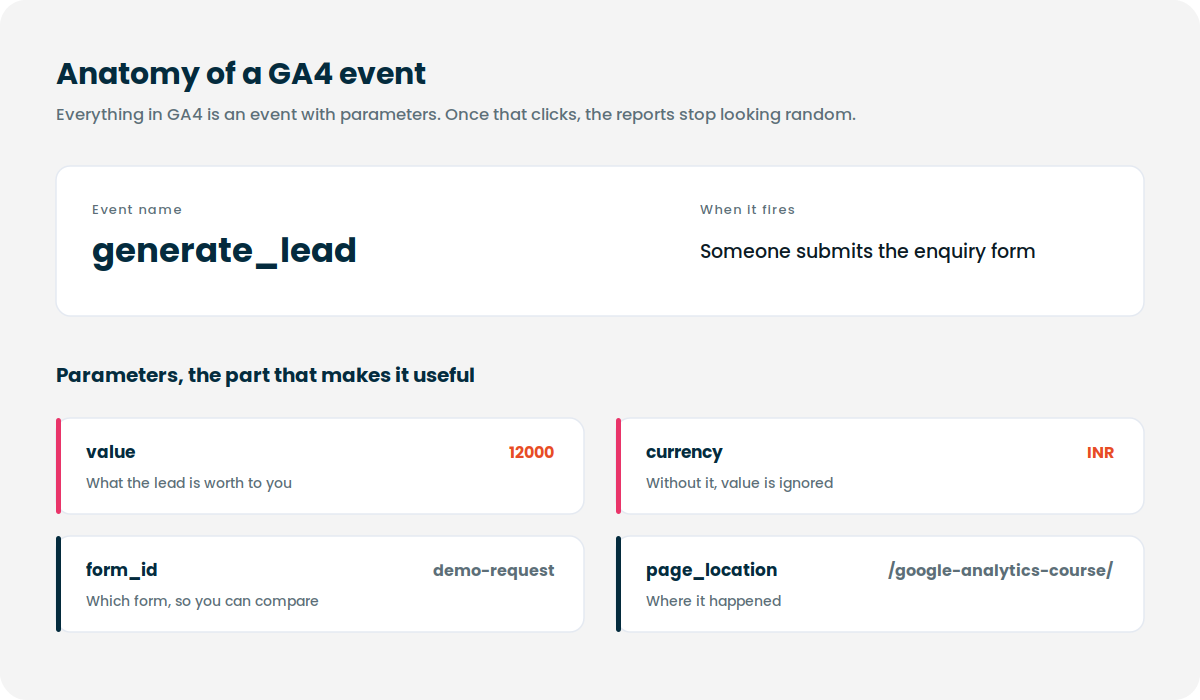
The basics are easy once events and parameters click. What trips people up is planning consistent tracking across a whole site and then reading the reports without misinterpreting them. Practice on a real property fixes both, which is why this track is built around one.
Why does GA4 feel harder than the old Universal Analytics?
Because it measures events rather than sessions, so every habit built on the old model has to be relearned. Once you accept that everything is an event with parameters, the reports stop looking random.
Can I use GA4 for SEO reporting?
Yes, and it is one of the better uses. Track organic sessions, landing page engagement, scroll depth and conversions, then link Search Console for queries and impressions. That combination tells you which pages bring traffic and which of them earn something. Covered further in the SEO course.
What if I miss a session?
Sessions are recorded and you keep access. You can also sit through the same module again with the next batch at no extra cost.
Stop guessing whether your numbers are real
The full GA4 track sits inside our Digital Marketing course, with 2 months of job assistance once you finish. Book a demo and see a session before deciding.